MySQL Person Database with Docker Compose
This project sets up a MySQL database with a predefined schema and sample tables using Docker Compose.
It also includes phpMyAdmin for easy database exploration and running SQL queries.
🚀 Project Structure
docker-compose.yml: Defines MySQL and phpMyAdmin services.data/: Contains .sql files to create database tables automatically.README.md: Project documentation.
📦 Services
- MySQL (mysql-container)
- Image:
mysql:8.0
- Port:
3306
- Default database:
person
- User:
dbeaver
- Password:
StrongPass!123
- Root Password:
güçlü_bir_parola
-
Automatically loads SQL scripts from /docker-entrypoint-initdb.d/.
-
phpMyAdmin
- Image:
phpmyadmin
- Port:
8080
-
Provides a web interface for managing MySQL databases.
-
CloudBeaver
- Image:
dbeaver/cloudbeaver:latest
- Port:
8978
- Web-based database manager supporting multiple databases.
- Can connect to MySQL with:
- Host:
mysql
- Port:
3306
- Database:
person (optional)
- Username:
dbeaver
- Password:
StrongPass!123
▶️ How to Run
Start the project with:
docker-compose up -d
▶️ Access phpMyAdmin
Access phpMyAdmin at:
👉 http://localhost:8080
- User:
root
- Password:
güçlü_bir_parola
▶️ Access CloudBeaver
Access CloudBeaver at:
👉 http://localhost:8978
- Server/Host:
mysql
- Port:
3306
- Database:
person (optional)
- Username:
dbeaver
- Password:
StrongPass!123
🔧 Driver Properties:
allowPublicKeyRetrieval = trueuseSSL = false
▶️ Apache + PHP (apache-php)
- Build: from local
Dockerfile
- Base image:
php:8.2-apache
- Port:
8000 (host) → 80 (container)
- Volume:
./www:/var/www/html- Features:
pdo and pdo_mysql PHP extensions are installed.mod_rewrite is enabled.www/ directory contains:
index.html → main landing pagequery.php → example PHP script that can query the MySQL people database.
Access the web app in your browser via:
- http://localhost:8000
- Example PHP endpoint: http://localhost:8000/query.php
📊 Database Schema
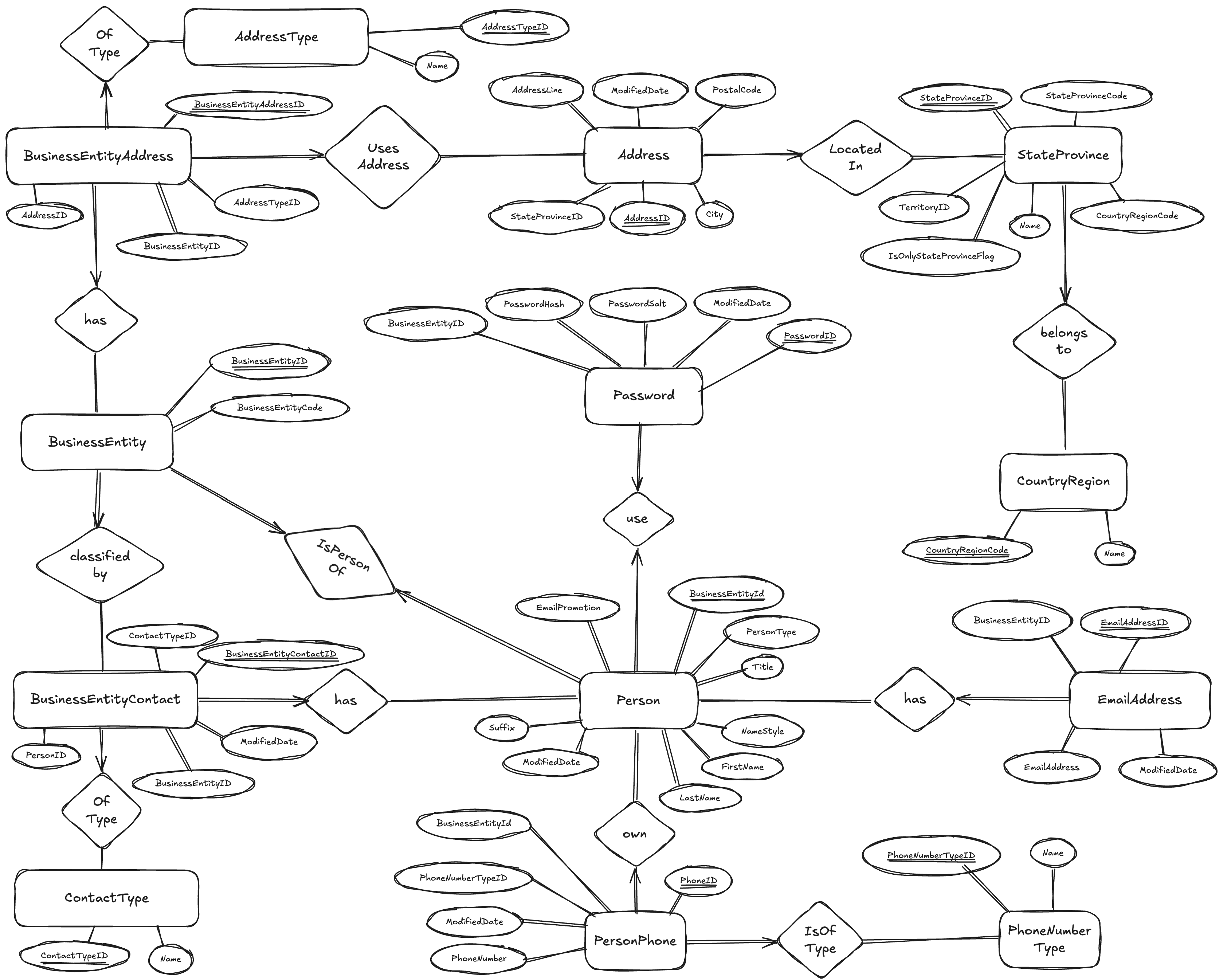
This project contains two database schemas:
- person: Holds information about people, addresses, business entities, and related attributes.
- reservations_system: Manages sailors, boats, and their reservation records.
🗂 Schema: person
1. AddressType
| Column |
Type |
Description |
| AddressTypeID |
INT |
Unique identifier for the address type (PK) |
| Name |
VARCHAR(100) |
Name of the address type |
2. CountryRegion
| Column |
Type |
Description |
| CountryRegionCode |
VARCHAR(3) |
Country code (PK) |
| Name |
VARCHAR(100) |
Country name |
3. BusinessEntity
| Column |
Type |
Description |
| BusinessEntityID |
INT (AUTO_INCREMENT) |
Unique identifier for the entity (PK) |
| BusinessEntityCode |
CHAR(36) |
Business entity code |
| Column |
Type |
Description |
| ContactTypeID |
INT (AUTO_INCREMENT) |
Unique identifier for the contact type (PK) |
| Name |
VARCHAR(100) |
Name of the contact type |
5. StateProvince
| Column |
Type |
Description |
| StateProvinceID |
INT |
Unique identifier for the state/province (PK) |
| StateProvinceCode |
CHAR(3) |
Code for the state/province |
| CountryRegionCode |
VARCHAR(3) |
Associated country code |
| IsOnlyStateProvinceFlag |
CHAR(1) |
Indicates if it is the only state/province |
| Name |
VARCHAR(100) |
State/province name |
| TerritoryID |
INT |
Territory identifier |
6. Address
| Column |
Type |
Description |
| AddressID |
INT |
Unique identifier for the address (PK) |
| AddressLine |
VARCHAR(60) |
Street address |
| City |
VARCHAR(30) |
City name |
| StateProvinceID |
INT |
Associated state/province ID |
| PostalCode |
VARCHAR(15) |
Postal code |
| ModifiedDate |
DATETIME |
Last updated date |
7. Person
| Column |
Type |
Description |
| BusinessEntityID |
INT |
Unique identifier for the person (PK) |
| PersonType |
CHAR(2) |
Type of person |
| NameStyle |
CHAR(1) |
Name style indicator |
| Title |
VARCHAR(8) |
Title (e.g., Mr, Ms) |
| FirstName |
VARCHAR(100) |
First name |
| LastName |
VARCHAR(100) |
Last name |
| Suffix |
VARCHAR(10) |
Name suffix |
| EmailPromotion |
INT |
Email promotion preference |
| ModifiedDate |
DATETIME |
Last updated date |
8. EmailAddress
| Column |
Type |
Description |
| BusinessEntityID |
INT |
Person identifier (PK, composite) |
| EmailAddressID |
INT |
Email address identifier (PK, composite) |
| EmailAddress |
VARCHAR(50) |
Email address |
| ModifiedDate |
DATETIME |
Last updated date |
9. Password
| Column |
Type |
Description |
| BusinessEntityID |
INT |
Person identifier (PK) |
| PasswordSalt |
VARCHAR(10) |
Password salt |
| PasswordHash |
VARCHAR(128) |
Encrypted password hash |
| ModifiedDate |
DATETIME |
Last updated date |
10. PhoneNumberType
| Column |
Type |
Description |
| PhoneNumberTypeID |
INT |
Unique identifier for the phone type (PK) |
| Name |
VARCHAR(100) |
Name of the phone type |
11. PersonPhone
| Column |
Type |
Description |
| BusinessEntityID |
INT |
Person identifier (PK, composite) |
| PhoneNumber |
VARCHAR(50) |
Phone number (PK, composite) |
| PhoneNumberTypeID |
INT |
Phone type identifier (PK, composite) |
| ModifiedDate |
DATETIME |
Last updated date |
12. BusinessEntityAddress
| Column |
Type |
Description |
| BusinessEntityID |
INT |
Business entity identifier (PK, composite) |
| AddressID |
INT |
Address identifier (PK, composite) |
| AddressTypeID |
INT |
Address type identifier (PK, composite) |
| Column |
Type |
Description |
| BusinessEntityID |
INT |
Business entity identifier (PK, composite) |
| PersonID |
INT |
Person identifier (PK, composite) |
| ContactTypeID |
INT |
Contact type identifier (PK, composite) |
| ModifiedDate |
DATETIME |
Last updated date |
🗂 Schema: reservations_system
1. Sailors
| Column |
Type |
Description |
| sid |
INT |
Unique identifier for the sailor (PK) |
| sname |
VARCHAR(255) |
Name of the sailor |
| rating |
INT |
Sailor’s rating value |
| age |
INT |
Age of the sailor |
2. Boats
| Column |
Type |
Description |
| bid |
INT |
Unique identifier for the boat (PK) |
| bname |
VARCHAR(255) |
Name of the boat |
| color |
VARCHAR(255) |
Color of the boat |
3. Reserves
| Column |
Type |
Description |
| sid |
INT |
Sailor identifier (FK → Sailors.sid) |
| bid |
INT |
Boat identifier (FK → Boats.bid) |
| date |
DATE |
Reservation date |