TrueBank Java Account Application
About the Project
This project is a basic bank account management application written in Java. It supports essential banking operations such as opening accounts, depositing money, withdrawing funds, transfers, and viewing transaction history. It can be used via the console or (if you choose to extend it) through a web interface.
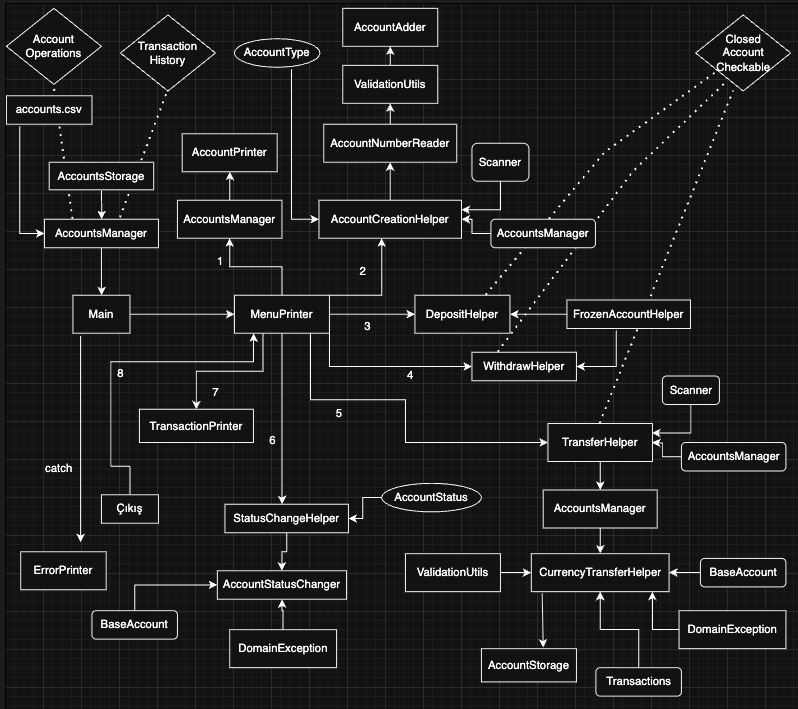
Folders
src/: Contains all Java source code.bin/: Stores the compiled.classfiles.
Running the Java Code from the Terminal
1. Navigate to the Accounts Folder
From the project root directory, enter the TrueBank folder with the following command:
cd ./TrueBank
2. Compile the Java Files
To compile all Java source files:
javac -d bin src/*.java
3. Run the Application
To run the main class (for example, Main), type the following command into the terminal:
java -cp bin Main
Features
- Open and close accounts
- Deposit and withdraw money
- Inter-account transfers (with currency conversion)
- Change account status
- View transaction history